Call Tracker
See what makes your phone ring.
Every call tied back to the campaign, keyword, and ad that drove it. Call recording, SMS, and real time reporting included.
Unlimited users. No contracts.
Google Maps SEO for Local Businesses
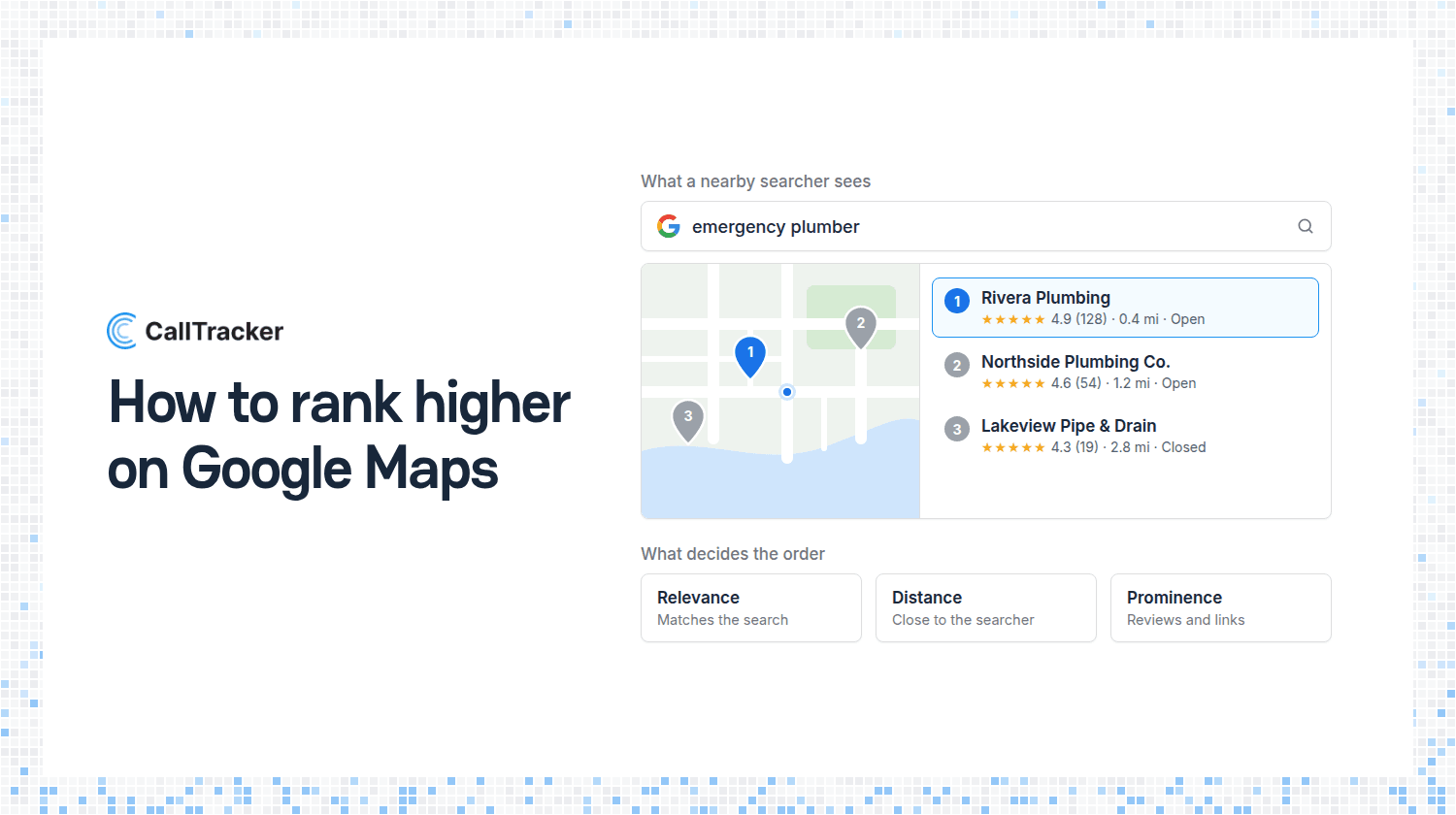
Google Maps SEO is the work of getting your business shown higher when someone nearby searches Google Maps or Google Search for what you sell. Most of it happens in your Google Business Profile, the free listing that holds your name, address, hours, category, photos, and reviews. Google says it ranks local results mainly on relevance, distance, and how well known the business is, and you can influence two of those three.
This guide covers how Google Maps ranking works in Google’s own words, a checklist to work through, the shortcuts that get profiles suspended, and how to count the phone calls your listing produces.
How Google Maps Ranking Works
Google publishes a short help page on how to improve your local ranking. Two sentences on it matter more than anything else you will read about local SEO:
- You cannot buy a higher position. "There's no way to request or pay for a better local ranking on Google."
- Three factors decide it. "Local results are mainly based on relevance, distance, and popularity." The page then describes that third factor under the heading "Prominence", which is the name most local SEO guides use.

Relevance
Google defines relevance as “how well a Business Profile matches what someone is searching for”. Its advice is to “provide complete and detailed business info”. This is the factor you control most directly. A profile with the right category, real hours, and a full description gives Google more to match against a search.
Distance
“Distance refers to how far each business is from the customer who’s searching.” If the searcher has not shared a location, Google “uses what it knows about their location”. You cannot change where your customers are standing. You can make sure your address or service area is accurate, so Google measures from the right place.
Prominence
“Prominence means how well-known a business is.” Google says this factor is “also based on info like how many websites link to your business and how many reviews you have”, and adds: “More reviews and positive ratings can help your business’s local ranking.” So reviews and links to your website both count.
A Google Maps SEO Checklist
Every item below comes from a Google help page. None of it is secret.
- Verify the profile. Google says verification "tells Google that you're authorized to represent the business, so it's more likely to show up in search results". Performance data is also only available for verified profiles.
- Use your real business name. Enter the name on your sign and your website, with nothing added.
- Choose a specific primary category. The category in the first field is your primary category, and you can add up to 9 more. Google's guidelines say to "use as few categories as possible" and to pick ones that complete the statement "This business IS a".
- Set an accurate address or service area. If you travel to customers and do not serve them at your address, Google's guidelines tell you to clear the address and set a service area. They also say the service area should not extend farther than about 2 hours of driving time from where the business is based.
- Keep your hours current, including special hours for holidays.
- Enter a local phone number. Google asks for "a local phone number instead of a central call center helpline number whenever possible".
- Write the description. You have 750 characters. Google suggests covering what you offer, what makes you special, and how long you have been in business.
- Add services and attributes such as parking or Wi-Fi.
- Add photos and videos. Google's wording: "You can show customers what you offer and tell the story of your business".
- Ask for reviews and reply to them. Google suggests sending customers a review link or a QR code. It says replying "shows that you value their feedback", and that "positive reviews and helpful replies can help your business stand out".
- Earn links to your website. Google counts "how many websites link to your business" toward prominence. Local news coverage, suppliers, and trade associations are honest places to start.
Google’s summary of why this works: “Businesses with complete and accurate info are more likely to show up in local search results.”
Shortcuts That Break Google’s Guidelines
Most “how to rank higher on Google Maps” tricks are things Google’s guidelines for representing your business prohibit by name.
- Keywords in the business name. "Including unnecessary information in your business name isn't permitted, and could result in the suspension of your Business Profile." Google's examples of what to leave out include marketing taglines, service or product information, and location information.
- Addresses you do not work from. "P.O. boxes or mailboxes located at remote locations aren't acceptable", and a virtual office "isn't eligible for a Business Profile".
- Categories used as keywords. "Do not use categories solely as keywords or to describe attributes of your business."
- Paid or rewarded reviews. Google's review page says offering incentives "in exchange for customers to post reviews, change reviews, or remove negative reviews is considered fake & misleading content and is strictly prohibited".
Suspension is the penalty Google names, so none of these is worth the risk.
What Google’s Calls Number Counts
Your Business Profile has a Performance report with a Calls figure. Google defines it as “the number of times a customer clicked on the call button on your Business Profile”. That definition leaves three gaps.

- It counts clicks on a button. Someone who reads your number off the screen and dials it by hand does not click anything.
- It stops at your profile. A customer who clicks through to your website and calls from there shows up as a website click.
- It mixes organic and paid. Google states that performance data "includes views, searches, and actions from both organic search results and Google Ads". The figure cannot tell you which calls your SEO earned and which your ad budget bought.
It also says nothing about who called or whether you answered.
How to Count the Calls Your Listing Produces
There are two places a listing visitor can call you from: your website, after clicking the website link, and the profile itself. They need different handling.
Calls from visitors who click through to your website
Without a tag on your profile’s website link, BrightLocal reports that traffic from your profile “will show in Google Analytics (GA) as either ‘direct’ or ‘organic’”. Its suggested fix is to add UTM parameters to the link, with source google, medium organic, and campaign gbp-listing. This is a practice documented by local SEO firms. The Google help pages we read for this guide do not cover it.
Once the link is tagged, dynamic number insertion can use it. In Call Tracker, a campaign tracker shows one tracking number only to visitors who match a rule you set, and a campaign parameter is one of those rules. Visitors from your listing see the listing’s number. Visitors from a Google Ads click see a different one. Both numbers ring the same phone, and your call reports show how many calls each produced. Your real number stays in the page’s code and on your profile.
Calls placed from the profile itself
The only way to count every call dialed from the profile is to put a dedicated call tracking number on it. We recommend doing that. Google’s guidelines for the phone field do not mention call tracking numbers. They say:
- "Provide a phone number that connects to your individual business location".
- "Do not provide phone numbers or URLs that redirect or 'refer' users to landing pages or phone numbers other than those of the actual business".
- "The phone number must be under the direct control of the business."
- "In addition to your primary business phone number, you can enter up to 2 more phone numbers."
So the profile has room for three numbers. Make the tracking number the primary one and put your real number in an additional phone field, so it stays on the listing. Set the tracking number up to meet the rules above: a local number, in an account your business controls, forwarding only to your own line.
Use that number in one place only. A number that also appears on a postcard no longer tells you the call came from Google Maps.
Separating Listing Calls From Paid Google Ads
Organic Maps results, Google Ads, and Local Services Ads all ring the same phone. Here is what you can and cannot separate.
- On your website, you can separate them. A visitor from an ad click and a visitor from your tagged profile link see different numbers. See Google Ads call tracking for the paid side and call tracking for SEO for the organic side.
- On the profile, you cannot. One number on a profile tells you the call came from the listing. It does not tell you whether an organic result or an ad put the listing in front of the caller, and Google's own Calls figure combines both.
- Local Services Ads use Google's own forwarding numbers, so Google counts them in its own lead list. Our guide to Google Local Services Ads covers that case.
If you are weighing paid placements next to your organic work, we cover them in Google Maps ads.
See how call tracking is set up for your trade: plumbers, HVAC, roofers, electricians, auto repair shops, and law firms, or browse all industries.
Frequently Asked Questions
What is Google Maps SEO?
The work of getting your business shown higher in Google Maps and the local results. Most of it is done in your Google Business Profile.
How do I rank higher on Google Maps?
Complete and verify your profile, choose a specific category, collect reviews, and earn links. Google ranks on relevance, distance, and how well known you are.
Can I pay Google to rank higher in Maps?
No. Google says there is no way to request or pay for a better local ranking. Ads are a separate placement.
What does the Calls number in my Business Profile count?
Clicks on the call button on your profile. It leaves out hand-dialed calls and calls from your website, and it combines organic results with Google Ads.
See Which Calls Your Listing Earned
Finish the checklist, tag your profile’s website link, and give your listing its own number. Start a 14 day free trial of Call Tracker to see listing calls and ad calls side by side. Plans start at $37 a month with 10 numbers and unlimited users, and the details are on the pricing page.

Alex Phelps
Published on