Dynamic Number Insertion
Install one script and your website shows each visitor their own tracking number, so every call is matched to the visit behind it.
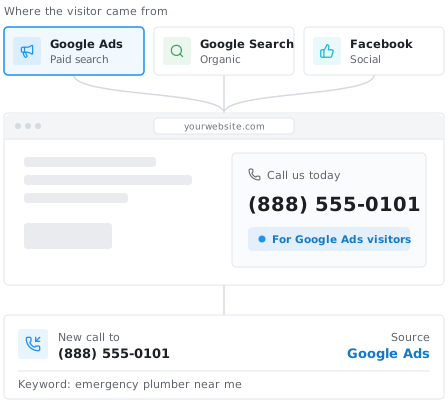
The Dynamic Number Insertion (DNI) script connects your website to Call Tracker. It swaps the phone number on your pages for a tracking number as each visitor arrives, which is how a call is matched to the website visit behind it. This page covers how to install it and how to choose which number each visitor sees.
Install the script
- In Call Tracker, go to Company Settings > Integrations > Dynamic Number Insertion.
- Copy the DNI snippet shown below your Company DNI API key.
- Paste it just above the closing
</body>tag on every page of your website.
On WordPress you can skip the copy and paste. Install the Call Tracker WordPress plugin, activate it, and add your DNI API key under Settings > Call Tracker. The plugin adds the script to every page for you.
Choose how numbers are shown
The script works with the two kinds of online tracker. You can run both on the same site.
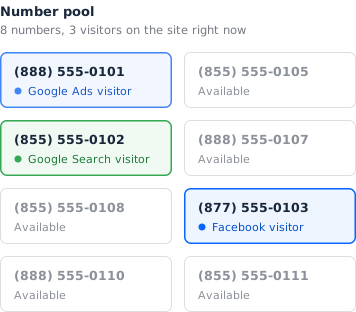
- Number pool tracker. Every visitor gets their own number from a pool, so each call maps back to the source, keyword and pages that produced it. Size the pool from the most visitors your site sees in an hour.
- Campaign tracker. One tracking number is shown only to visitors who match a rule you set: a search, a landing page, a referring site, a campaign parameter, direct traffic, or everyone.
Which number a visitor sees
When more than one tracker could match the same visitor, the script checks them in this order and stops at the first match:
- Campaign trackers matching a search
- Campaign trackers matching a landing page
- Campaign trackers matching a referral
- Campaign trackers matching a campaign parameter
- Campaign trackers matching direct traffic
- Campaign trackers set to always swap
- Number pool trackers
Every campaign tracker outranks every number pool. A paid search visitor sees your paid search number, a visitor from a partner site sees the referral number, and everyone else falls through to the pool.
What happens when the visitor calls
The tracking number forwards to the destination number you set on the tracker, usually your main business line. Nothing changes for the caller. The call record lands in your dashboard with the visit attached.

Send calls to Google Analytics and Google Ads
Send phone calls to Google Analytics as events to build goals and segments around calls, and feed conversions to Google Ads so your bidding learns from calls, not just form fills. Our Google Ads integration is built directly on top of DNI.
Get started
Setup takes a few minutes on most websites. Follow the Dynamic Number Insertion help guide for screenshots of each step, read how the number swap priority works, or start your 14-day free trial to try it on your own site.