Call Flows
Create custom inbound call handling flows for your business.
Our integrated Call Flow builder helps you build custom call handling logic that fits your business. Build a unique call flow for how you’d like to handle incoming calls.
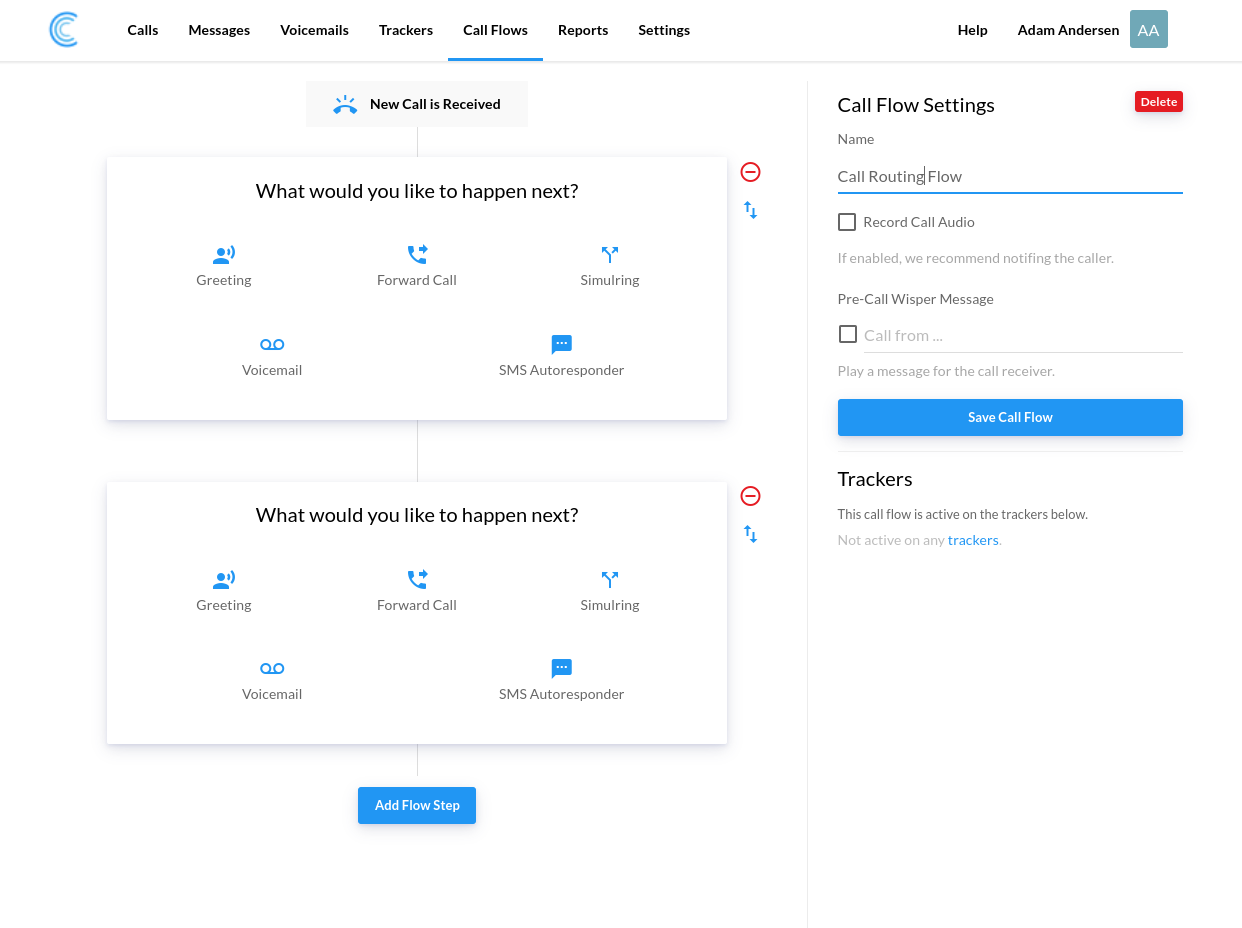
The Call Flow Builder
What Are Call Flows?
A call flow is a step-by-step process of how inbound calls are managed in the phone system of your business.
Simply stated, call flows are the paths calls take from the moment customers make the calls and enter your phone system until their question or query is resolved.
A call flow builder enables you to control how calls flow in your communication system.
When you are contemplating how your call flow should be structured, consider both the complex and simple customer interactions your business often encounters. This information will guide you to creating call flows that result in satisfied customers and happy call recipients.
When clients or customers make calls to one of your call tracking phone numbers, well-designed call flows will increase efficiency, save time, and give them control as to which department in your business they wish to reach.
Every business requires different call flows, and our top-notch call flow builder allows you the opportunity to create a flow process that will optimize the communication system of your business and your call tracking efficiency.
The Steps You Can Build With
Each step handles one part of the call, and you stack them in whatever order suits your business. A step that goes unanswered hands the caller to the next one, so a flow degrades gracefully instead of dropping the lead.
Greeting
The few seconds before a call connects are the cheapest place to set expectations. Play a short message so callers know they reached the right business, and use it to tell them the call may be recorded, which is where most companies meet their disclosure obligation. Type the message and we speak it, or upload a recording in your own voice.
Dial
The straightforward one: send the call to a number. What makes it useful in a call flow is the ring timeout. Set how long it rings before the caller moves to the next step, so a phone nobody is sitting next to costs you a few seconds rather than the whole lead. You can also show the tracking number as the caller ID, so whoever picks up knows the call came from marketing before they say hello.
Simulring
Ring 2 to 10 numbers at once and connect whoever answers first. If nobody does, the caller carries on to the next step. This suits a small team with no fixed pecking order, or an after-hours setup where the call goes to three mobiles and the first person free takes it, rather than a caller working their way down a list of people who are all busy.
IVR Menu
Let the caller choose the department instead of guessing which number to dial. One advertised number can serve service, parts and sales, and each option gets its own handling behind it. Read more about the IVR Menu.
Voicemail
Some calls arrive when nobody can take them, and a caller who hits a dead line usually calls a competitor next. A voicemail step catches them, and you get the recording with a transcript so you can see what they wanted without playing the message back. Read more about Voicemail and transcription.
Settings That Apply Across the Whole Flow
- Call recording on every answered call, whichever route the caller took to get there.
- AI transcriptions so you can read a call instead of replaying it.
- Pre-answer whisper messages that tell your team which campaign the call came from before they say hello.
- Notifications by email and SMS so a missed call still reaches somebody.
Call Recording Gives You Highly Valuable Feedback
Recording a sales call may seem like a simple tool, but it offers your company an abundance of opportunities. Beyond simply improving training measures or monitoring employee behavior, it can give you true insights into building better marketing strategies.
Listening to your recorded phone calls will allow you to pinpoint the keywords and the advertising methods that are striking a chord with your customers. You can get concrete data on what marketing efforts are getting your customers to pick up the phone. It can also help your sales team hear where they are excelling and where they need a little improvement to close the deal.
When your company has onboarded, for example, a significant number of customer service reps, recording can help your employees improve first call resolution during training time to provide an overall better customer experience.
How Can Your Company Benefit From A Customized Call Flow
You can use a call flow designer to create tailored call flows to ensure an excellent customer experience so customers will regard your business with respect and positivity.
Well-built call flows will move fluently down the call flow through a step-by-step process that will easily route calls to the right person.
To understand what an adequate call flow designer can do for your business, consider the following example of a high-quality call flow:
You have a contact center in each of a number of different locations around the world, and you want to ensure good customer service in every contact center.
With our call flow builder, you can create a call flow according to location-based routing or geo-routing rules.
With this call flow, call routing will ensure that inbound calls displaying specific locations and caller IDs will be forwarded to a nearby service team in the time zone of the caller.
Furthermore, suppose your business has numerous departments interacting with customers, such as technical support, customer support, advertising, and billing.
With our call flow designer, you can create a call flow process that makes it easy for a caller to navigate their way to the right department.
Add an IVR Menu step and callers select the department they want: press 1 for Customer support, press 2 for the Sales department, press 3 for Billing.
With our call flow designer, large and small businesses can manage leads, avoid missed calls, and track calls more efficiently.
Inbound Call Tracker Call Flows Features
1: Pre-answer Whisper Messages
Adding whisper messages to your call flow allows your team members to understand the prompts for the incoming calls immediately.
This allows the team to tailor their sales approach for the customer before they even answer inbound calls.
The whisper message plays immediately before the call with the customer is connected. It doesn’t add significantly to their wait time, but it does tremendously help your sales approach.
The message can give the team member insight into what marketing channel triggered the call or where the call was originated, such as a social media channel or a billboard advertisement.
If you are running a multitude of marketing campaigns and receiving a high call volume, whisper messages can be a very valuable additional feature in your call tracking software.
2: Use Call Flows For Inbound Call Handling of Your Tracking Numbers
Now that your call flow is set up, you can use your call flows to handle inbound calls to your tracking numbers.
To do this, go to your tracker settings and update Inbound Call Handling to use your newly created call flow.
As you can essentially have as many tracking numbers as you like, you can attach these numbers to call flows in bulk.
You may choose to assign many numbers to one call flow or use a multitude of call flows for different purposes.
This feature facilitates the scalability of your business and makes for an excellent call center solution.
Read more about Call Flows and Voicemail.